

Satellites sensor
Number of GPS satellites in use. Tells you how reliable each position is.
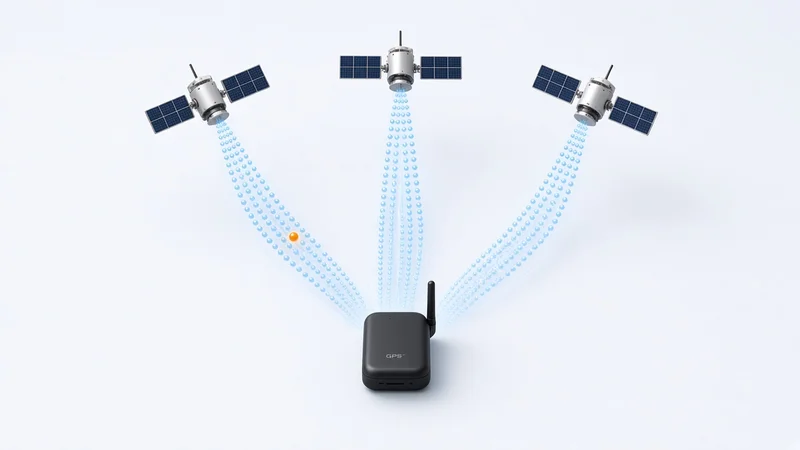
[ How to set it up in TrackeraX ]
- Open the device in TrackeraX and add a sensor of type “Satellites”.
- Pick the parameter the device sends for it, for example sat.
- Adjust the options below (unit, formula, calibration…) and save.
- The value shows on the map, in history, charts and reports, and you can use it in alerts.
[ Sensor options in TrackeraX ]
- Historyadd_to_history
- Map widgetadd_to_widgets
- ASCII decodingascii
- Bit extractionbitcut
- Value mappingmapping
- Text extractionsetflag
[ Device data it uses ]
- Satellitessat
- Visible satellitessatVisible
[ GPS protocols that send this data ]
Protocols whose decoder delivers the data above. Each device sends it only if its firmware and installation allow it.
- gt06249 models
- teltonika182 models
- gl200146 models
- h02124 models
- jt808105 models
- suntech101 models
- meiligao71 models
- calamp62 models
- meitrack59 models
- t800x46 models
- atrack43 models
- gosafe42 models
- upro40 models
- navis39 models
- eelink37 models
- ruptela35 models
- watch35 models
- castel31 models
- megastek31 models
- totem31 models
- xirgo31 models
- jt60030 models
- gps10329 models
- alematics26 models
- taip26 models
- skypatrol24 models
- t5524 models
- minifinder21 models
- mta620 models
- astra19 models
- esky19 models
- rst18 models
- fifotrack17 models
- starlink17 models
- aquila16 models
- cellocator16 models
- startek16 models
- xexun216 models
- globalsat15 models
- mxt15 models
- adm14 models
- intellitrac14 models
- pt50214 models
- trv14 models
- iotm13 models
- wondex13 models
- xexun13 models
- cityeasy12 models
- bce11 models
- mictrack11 models
- minifinder211 models
- topin11 models
- tramigo11 models
- aplicom10 models
- autofon10 models
- bstpl10 models
- avema9 models
- omnicomm9 models
- armoli8 models
- cguard8 models
- gator8 models
- telic8 models
- anytrek7 models
- arnavi7 models
- easytrack7 models
- genx7 models
- portman7 models
- pretrace7 models
- starcom7 models
- wialon7 models
- freematics6 models
- gpsmarker6 models
- maxpb6 models
- mobilogix6 models
- moovbox6 models
- ndtpv66 models
- piligrim6 models
- apel5 models
- disha5 models
- t622iridium5 models
- fleetguide4 models
- flextrack4 models
- g2004 models
- oigo4 models
- oko4 models
- orion4 models
- robotrack4 models
- techtlt4 models
- visiontek4 models
- vnet4 models
- vt2004 models
- xexun34 models
- arknavx83 models
- egts3 models
- flespi3 models
- gl6013 models
- granit3 models
- its3 models
- jmak3 models
- nvs3 models
- radar3 models
- satsol3 models
- tmg3 models
- ttnhttp3 models
- tytan3 models
- xt24003 models
- ywt3 models
- appello2 models
- flexapi2 models
- flexcomm2 models
- homtecs2 models
- jido2 models
- kenji2 models
- m2c2 models
- maestro2 models
- navigil2 models
- niot2 models
- omnijq2 models
- plugin2 models
- progress2 models
- racedynamics2 models
- radshid2 models
- raveon2 models
- retranslator2 models
- s1682 models
- sabertek2 models
- smartsole2 models
- techtocruz2 models
- tlv2 models
- uux2 models
- vlt2 models
- vtfms2 models
- ardi011 models
- at20001 models
- avl3011 models
- bws1 models
- dolphin1 models
- easytrackplus1 models
- g1rus1 models
- gps0561 models
- gt06qze1 models
- icar1 models
- idpl1 models
- its21 models
- m2m1 models
- maxitrac1 models
- naviset1 models
- obddongle1 models
- ruptela21 models
- siwi1 models
- snapper1 models
- sprint3x1 models
- suntech21 models
- teltonika21 models
- trackbox1 models
- trakmate1 models
- transync1 models
- tzone1 models
- xrb281 models
- xt0131 models
- xt71 models